Navigation Menu
e-motional.com software


Secure your workstation or server with Password Protection while viewing programs that are running in the background.

Product Description:

Transparent Screen Lock enables IT professionals to prevent unauthorized system access, while maintaining the ability to view applications running on the desktop for monitoring purposes.

Transparent Screen Lock PRO delivers system security measures that are essential in today's open-concept corporate offices with free movement of employees and visitors, as well as in high security environments such as financial institutions and banks, hospitals and pharmaceutical research facilities, government offices and military installations.

With its ability to limit system access to authorized individuals in both stand-alone and multiple-user shared computer environments, Transparent Screen Lock PRO is ideal for facilities which must ensure compliance to the 21 CFR Part 11 code of federal regulations.

With new optional support for a hardware proximity sensor, TSL-PRO delivers maximum security by automatically locking the system when the user steps away from the station. when the user approaches the system, TSL-PRO's password-protected logon screen is automatically displayed.


Now Available!      Transparent Screen Lock SMART CARD      A new addition to the TSL family, TSL-SC allows you to authenticate users using a Windows compatible Smart Card.  In addition to all of the features of TSL-PRO, this version will allow you to unlock the system with a SmartCard.  The system can be locked after a configured idle time or on removal of a Smart Card.  To obtain more information and download a free evaluation version please visit the Transparent Screen Lock SMART CARD information page.

Also Available!      Transparent Screen Lock RFID    Containing a superset of TSL-PRO functionality, TSL-RFID allows users to unlock their system using an RFID card.  The software can be configured to require either an RFID card or the user’s Windows logon credentials, or both an RFID card and the user Windows password.  The first option provides quick, easy but still secure access while the other results in a system with a two-factored access requirement.  To obtain more information and download a free evaluation version please visit the Transparent Screen Lock RFID information page.


Who Needs "Transparent Screen Lock" for Windows 2000/XP/2003/Vista?

Anyone who needs to Password Protect access to their workstation or server.

TSL provides a secure password mechanism for Win2k/XP/2003/Vista - and runs "transparently" - so you can still monitor the programs that are running. This is ideal for:

  • System Administrators:control access to single-user or multi-user systems in a corporate environment.

  • Labs and Production Floors: monitor processes while maintaining access control: 'see, but do not touch'.

  • Retail Stores, Kiosks, Tradeshow Demos: prevent unauthorized access.

  • Home users: parents can control a child's computer time; email or instant message users can monitor incoming messages, while restricting access to your computer.


Features of "Transparent Screen Lock" for Windows 2000/XP/2003/Vista:

Choose the version that is right for you:

Feature TSL TSL-PRO
Password Protection
Grant access to Administrator/other authenticated users  
Grant access to specified "User Groups" (local or global)  
Ease of configuration for multi-user shared computer system  
Control usage of Ctrl-Alt-Del
Completely block Ctrl-Alt-Del key sequence  
Remove process from Task Manager  
Shutdown/Logoff after X number of invalid logons  
Option for only Administrator to configure program  
Log File saved locally or on network
Log File saved to Application Event Log  
Quick-launch icon
Lock system after preset time interval
Blank screen when locked  
Dim screen when locked  
Clear desktop icons/task bar
Multiple-monitor support
User-friendly setup program
Proximity Sensor hardware option
(Automatically locks the system when the user walks away)
 
Standard Windows Screensaver Module  
Remote Desktop Terminal Server support  
Onscreen Keyboard for tablet support  
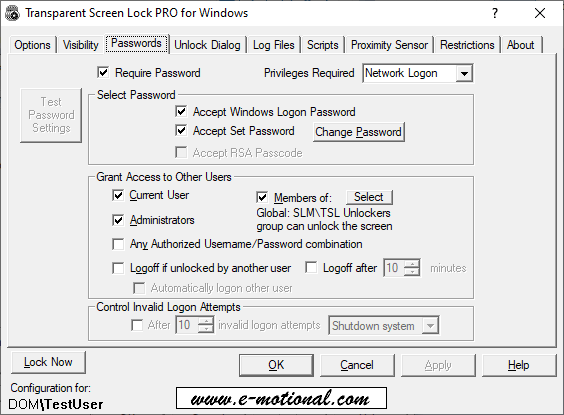
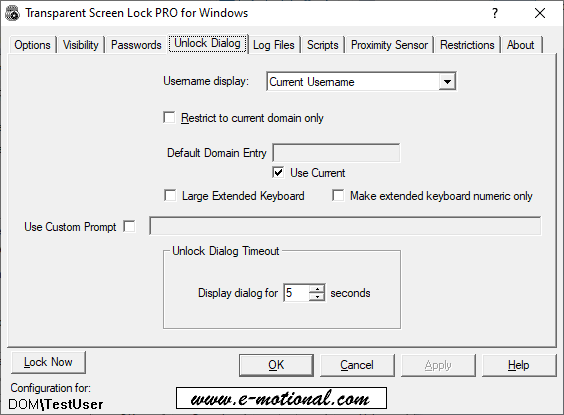
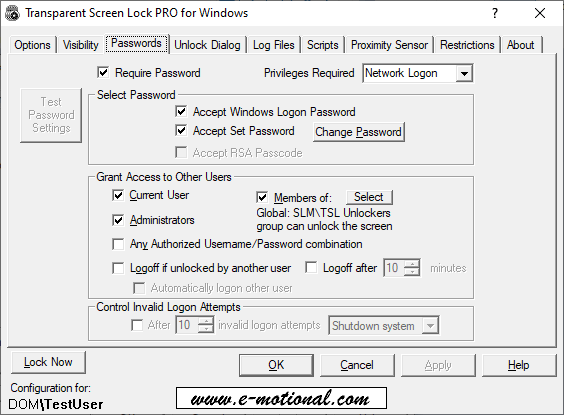
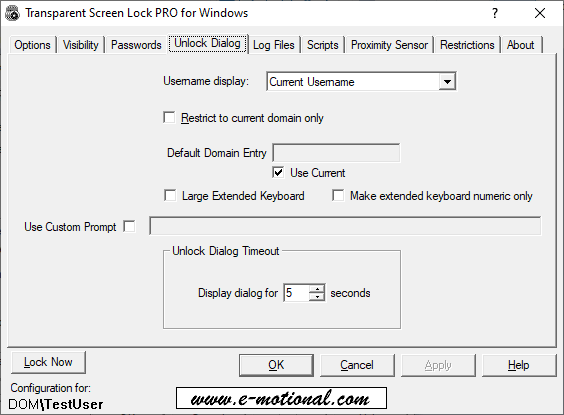
  • Password Protection. Any attempts to access your workstation or server while TSL is running (by typing a key or moving the mouse) require a valid username and password to be entered. If no password is entered, the password dialog box will disappear after 5 seconds. Options include:
    - USE SYSTEM LOGON PASSWORD: The software will expect the user to type in their logon password - the same password that is used to log on to their account. NOTE: This is the default option.
    - CONFIGURE WITH NEW PASSWORD: You may also choose to enter a different password manually via the configuration program.
    - Added support for alternate characters on international keyboards in the password.
    (TSL-PRO Only)

  • Grant access to other users. (TSL-PRO Only) Ideal for multiple-user shared computer environments. Enables an adminstrator, a specified group of users, and/or other authenticated users to access the system without closing the current session. Options include:
    - accept current user's password only,
    - accept users with Administrative Privileges,
    - accept any valid username/password combination in the facility,
    - accept members of a specified "User Group" (local or global).
    - New "unlock dialog" configuration tab provides additional control over how the password dialog box is displayed, including options to automatically populate the username field, restrict access to users of one domain only, and configure a timeout value.

  • Simplified program configuration in a multiple-user shared computer environment.
    (TSL-PRO Only)
    -
    An Administrator can install the program once, and the program and associated icons will automatically be available on the desktop of all users sharing the computer.
    - Make program settings on a per-user basis or on a system/machine basis. This time-savings feature enables an administrator to makde configuration changes once, and have them applied to all users of that system.

  • TSL Screensaver Module. (TSL-PRO Only) Allows you to select Transparent Screen Lock PRO from the "Screensaver" Tab of the "Display Properites" applet.  Active Directory users can enforce the use of TSL by selecting Transparent Screen Lock.scr as the current screensaver using Group Policy.

  • Remote Administration. (TSL-PRO Only) Setup program includes an Administrative Template (tsl.adm) that can be read by your GPO Editor to manage all of TSL's settings remotely.

  • Terminal Server Support. (TSL-PRO Only)  Allow users to view a remote desktop but disallow any interaction with the remote system.

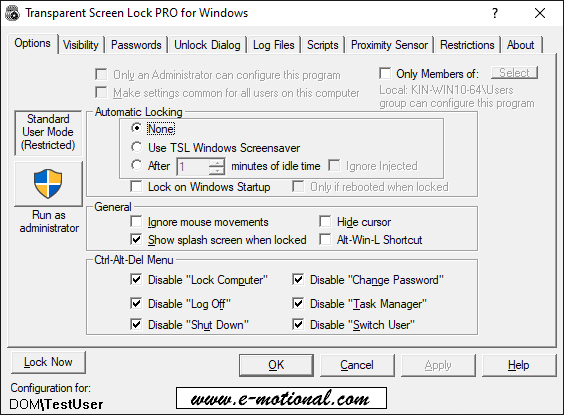
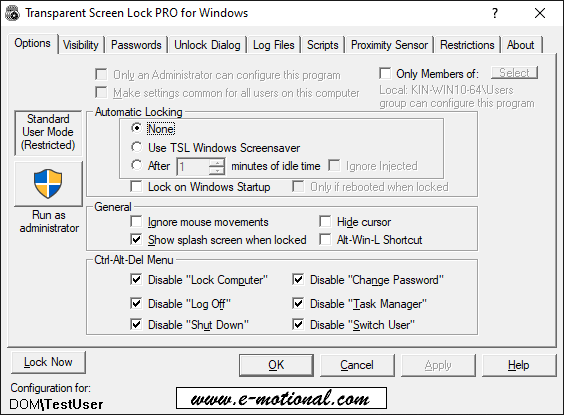
  • Control usage of CRTL-ALT-DEL. Choose to disable any or all of the CRTL-ALT-DEL menu options to prevent tampering with the system.

  • Completely block the CRTL-ALT-DEL key sequence. (TSL-PRO Only) In selecting this option, no menu will be displayed if the user hits CRTL-ALT-DEL.

  • Option to remove Process from the Windows Task Manager. (TSL-PRO Only) Prevent users from disabling the program.

  • Option to shutdown system or Logoff current user after a specified number of invalid logon attempts. (TSL-PRO Only) Provides attitional system security.

  • Administratove Control. (TSL-PRO Only) Choose to allow only a user with full Administrative Privileges to access the configuration program.

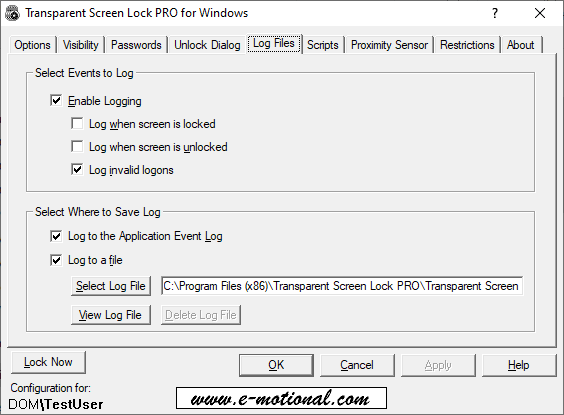
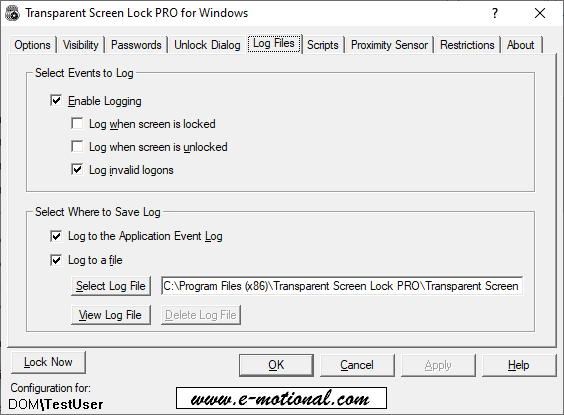
  • Log File. Create a log file to document activity and logon attempts.
    - Document the time and date of when TSL was active/inactive.
    - Provide a list of invalid login attempts, with details of the attempted passwords.
    - The log file may be saved either locally, at a remote network location, or
    - (TSL-PRO Only) for maximum security, save the log file to the Windows Application Event Log.

  • Run the Transparent Screen Lock program at any time, or configure with a time-out interval.
    - Run TSL automatically at a preset time interval like a screensaver

    - Or, run TSL immediately by clicking on the quick-launch icon in the Windows Tool Tray:

  • Quick Launch Option.

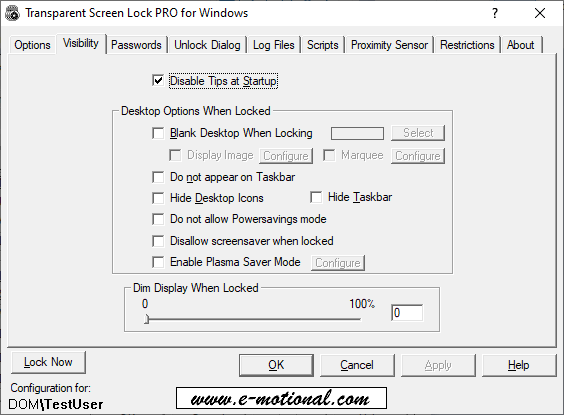
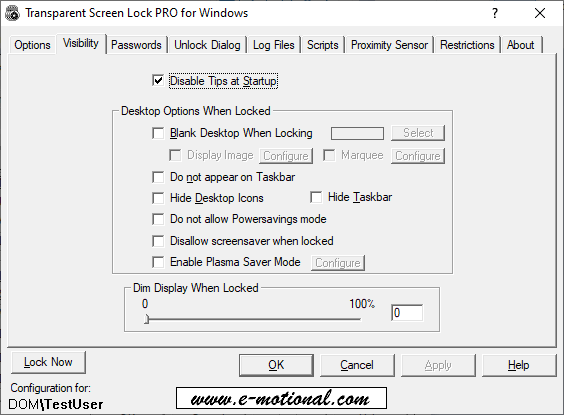
  • Blank Screen Option. (TSL-PRO Only) Choose to display a blank screen when the system is locked, rather than viewing programs running on the desktop. (Ideal for preventing unauthorized system access, in a stand-alone or multi-user environment with all the features listed here, while preventing the display of confidential information.)

  • Dim Screen Option. (TSL-PRO Only) Control the amount of opacity of the display when the system is locked. Enter an integer between 0 (completely transparent) and 100 (black display). NOTE: This option is available for Windows 2000/XP/2003, and not for NT.

  • Plasma Screen Saver Option.(TSL-PRO Only) A black bar of variable width floats across the screen preventing Plasma Screen Burn-In.  This option allows TSL to be used as a Plasma Screensaver.

  • Clear Desktop Option. Remove icons and task bar from desktop display when locked.

  • Multi-Monitor Support. Run the program in a dual or multi-monitor environment.

  • User-friendly setup program. Includes various user-friendly features, including embedded context-sensitive help file, tip of the day upon startup, and keyboard shortcuts for mouseless operation.

  • Biometric Identification. A biometric version (TSL-BIO) that allows you to authenticate users using a fingerprint scanner is available upon request.  For more information on TSL-BIO or to obtain a free trial version please contact us at sales@e-motional.com

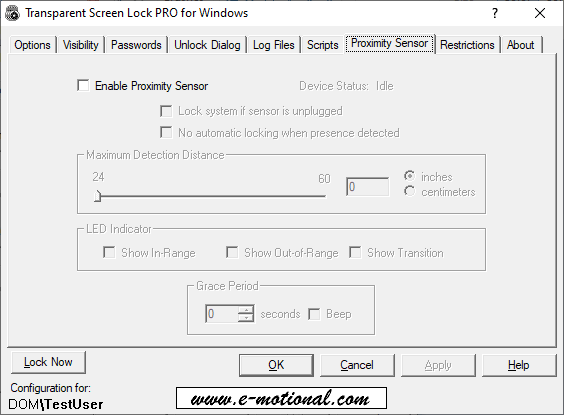
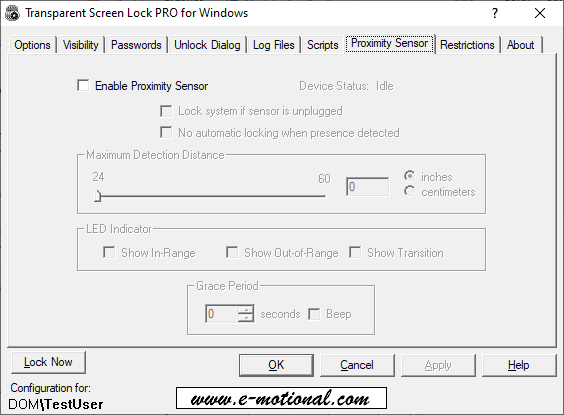
Proximity Sensor hardware option. (TSL-PRO Only) With new optional support for a hardware proximity sensor, TSL-PRO delivers maximum security by automatically locking the system when the user steps away from the station. When the user approaches the system, TSL-PRO's password-protected logon screen is automatically displayed.

Includes an option to automatically enable the "Lock Now" feature, and immediately secure the system, in the event that the "Proximity Sensor for TSL-PRO" is accidentally disconnected from the computer's USB port.

  Proximity Sensor details and hardware specifications.
NOTE:
supports Windows 2000/XP/2003, not WinNT.

Choose the version that is right for you:

  • Single-user system

   Transparent Screen Lock

  • Multi-user shared computer system
  • More Administrative control
  • Option to select TSL as your Windows Screensaver 
  •   Proximity Sensor hardware option

Transparent Screen Lock "PRO"

Download a free evaluation copy now!

Transparent Screen Lock PRO (v. 5.45)


Download Site #1

Download Site #2

MSI Version of setup available upon request


Transparent Screen Lock (Base Version 2.10)

Download Site #1

Download Site#2

 
  • TSL-PRO Version 4.10 can be downloaded here
    • TSL-PRO Version 4.50 can be downloaded here

    • TSL-PRO Version 4.60 can be downloaded here

    • TSL-PRO Version 5.00 can be downloaded here 

    • TSL-PRO Version 5.10 can be downloaded here  

    Also available for Win95/98/Me: Password Lock Transparent Screensaver

    Our Customers:

    Our customers include: Banks & Financial Institutions, Hospitals & Pharmaceutical companies, Schools, Government & Military Installations, and various other companies.

    Please click here for a partial list of our customers.

    Software Pricing:

    Single-copy or Volume User Licenses of "Transparent Screen Lock" are available:

    Number of licenses "TSL" "TSL-PRO"
    Quantity 1-9 $24.95 each $49.95 each
    Quantity 10-24 $22.45 each $44.95 each
    Quantity 25-49 $21.20 each $42.45 each
    Quantity 50+ $19.95 each $39.95 each
      Purchase TSL Now Purchase TSL-PRO Now
     

    Please contact sales@e-motional.com
    for higher volume quotations.


    Software Upgrades:

    • Existing TSL customers may upgrade to TSL-PRO at a cost of $24.95 per user license. Volume discounts apply. Please click here to purchase an upgrade. here

      • TSL-PRO Version 4.60 can be downloaded

        TSL-PRO Version 4.50 can be downloaded here 

      • TSL-PRO Version 4.60 can be downloaded

    Purchase "TSL-PRO/PROXIMITY" Now

     
    here

  • TSL-PRO Version 5.00 can be downloaded here 

  • TSL-PRO Version 5.10 can be downloaded here

  • Also available for Win95/98/Me:ars.

    System Requirements

    • WinNT, Win2K, XP, Windows Server 2003,Vista
    • 1MB of free disk space
    • 16MB of RAM

    Screen Shots

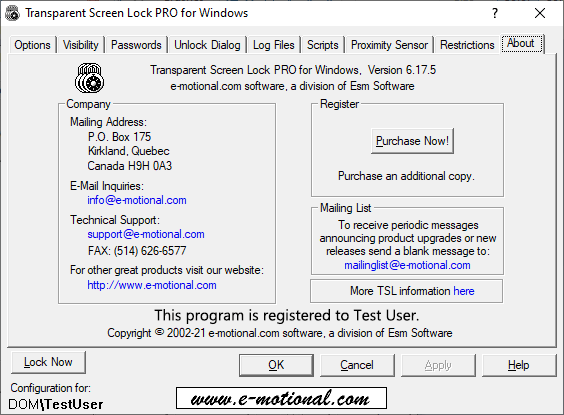
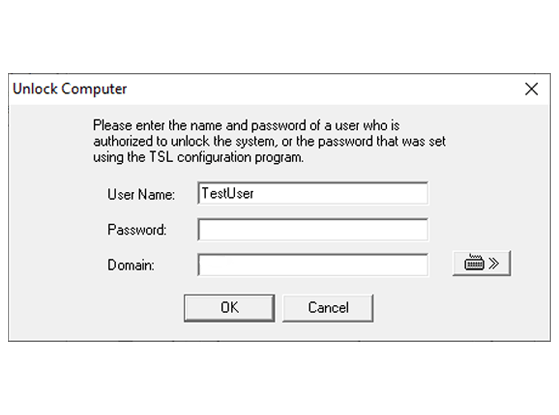
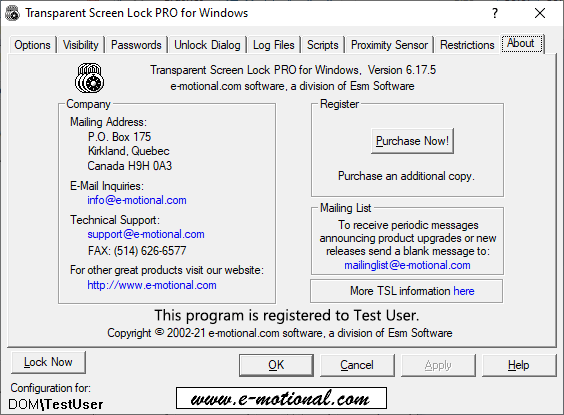
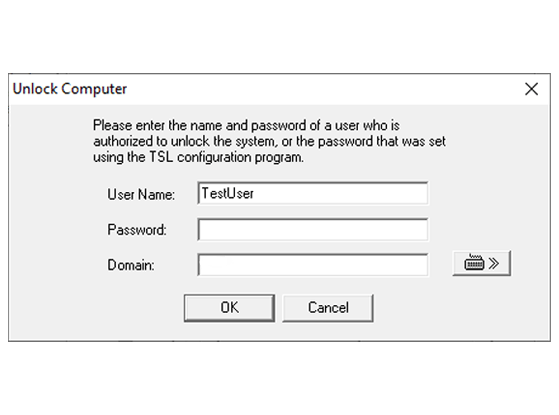
    "Transparent Screen Lock" is simple to install and launch, and will enable you to see-through to the applications that are running. Please see the following screenshots:

    Transparent Screen Lock:

    Transparent Screen Lock PRO:

    Support

    For Technical support:


    Home | Software | Purchase | Download | Company | Français

    Copyright © 2002-2008 Esm Software. All Rights Reserved.

    clearscrsvr.exe clearscrsvr ClearSaverSvc.exe ClearSaverSvc